I settled on a Netgear modem / router combo, which I disabled the routing features on, and an Apple Airport Express. Surprisingly, the AE supports PPPOE, further simplifying my configuration.
1.
Configure the modem. In this case, we want the modem to do only the
most basic task, bridging the company to our router. To accomplish
this, the modem will need to be configured to bridged mode. Connect
your computer and the modem via an ethernet cable. Open a browser
and navigate to www.routerlogin.net.
This will bring you to the modem's setup page. The default username
and password is admin / password. Go to the Device Mode page and
change the device mode to modem only, then click apply and wait a
minute.
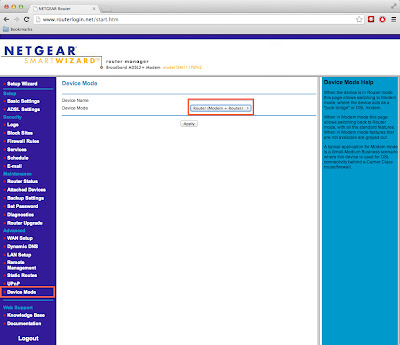
Next go to the ADSL setup page and change the VPI number to
8 instead of 0. Click apply there and you're done. Edit August 27, 2015: This guide should apply to other DSL carriers though. Check this page link
to figure out your VCI and VPI settings for your provider.

2. It's time to setup the Airport Express. This step can be performed
from a Mac or Windows machine using the Airport utility. Plug the
ethernet cable from your modem into the “O” port on the back of
the AE. Open Airport utility and choose the new AE to configure.
Name your new AE and give it a password.

If the modem was configured properly, your next screen should look like this.

Use
the username and password provided by your ISP to log in here. Click next one more time and you're done. You now have a functional WiFi network and a connection to the internet. Feel free to adjust the AE settings. I would recommend changing the AE's network or admin password, as it uses the same password for configuring the device and giving access to the WiFi network. You don't want your guests messing around with your settings.If the modem was configured properly, your next screen should look like this.
Edit August 27, 2015
I moved into a new house across town and got my internet hooked up today. I hadn't messed with the modem for a while and I had forgotten how to configure it. Naturally, I googled "centurylink apple airport" and found my own guide. And the process still works almost two years later. Hooray for writing documentation!
DSL Modem settings
http://www.speedguide.net/articles/adsl-vpi-vci-and-encapsulation-settings-2786
In case the first link ever goes dead:
http://web.archive.org/web/*/http://www.speedguide.net/articles/adsl-vpi-vci-and-encapsulation-settings-2786

